


Stream Integration
Automate Shipping, Delivery Planning and Tracking with Stream
The Stream integration connects the Linnworks Order Management System with the Stream logistics platform to automate shipment processing, route planning, shipping label generation, and delivery tracking.
This integration enables orders created in Linnworks to be automatically sent to Stream for shipment processing. Once shipments are created, Stream synchronizes shipment details, tracking numbers, and delivery updates back to Linnworks.
By connecting these systems, businesses can streamline their fulfillment workflow, reduce manual operations, and gain full visibility of shipment processing.

How It Works
How the Stream Integration Works in Linnworks
1. Integration Overview
The Stream integration provides seamless communication between Linnworks and the Stream logistics platform through secure API services.
Orders managed in Linnworks can be automatically transferred to Stream for shipment creation and delivery planning. After shipments are processed in Stream, the integration synchronizes shipment information back to Linnworks.
Key Capabilities:
- Automated order synchronization
- Shipment creation in Stream
- Delivery route planning
- Shipping label generation
- Tracking number synchronization
- Real-time delivery status updates
This integration helps businesses manage shipping operations efficiently while maintaining accurate order records in Linnworks.
2. System Architecture
The Stream integration uses a service-based architecture to connect Linnworks and the Stream platform.
Core Components
- Linnworks Order Management System : Handles order management, inventory control, and dispatch processes.
- Stream Logistics Platform : Processes shipments, manages delivery routes, and handles shipment tracking.
- Integration Service Layer : Acts as a middleware service that synchronizes data between Linnworks and Stream using API communication.
Data Flow
- 1. Orders are created in Linnworks.
- 2. Orders are sent to the Stream platform through the integration service.
- 3. Stream processes shipments and assigns delivery runs.
- 4. Shipment information and tracking numbers are generated.
- 5. Shipment updates are synchronized back to Linnworks.
This architecture ensures reliable communication and real-time synchronization between both platforms.
3. Installation and Setup
Before configuring the Stream integration, the following prerequisites must be available.
Prerequisites
- Active Linnworks account
- Access to the Stream platform
- Stream API credentials
- Warehouse configuration in Linnworks
- Sender address configuration
Integration Setup Steps
- 1. Configure API credentials for Stream.
- 2. Connect the Stream integration service.
- 3. Configure warehouse details.
- 4. Set up sender address information.
- 5. Map shipping services between Linnworks and Stream.
- 6. Enable order synchronization.
Once configured, the integration will automatically process orders and shipments.
4. Service Configuration
Shipping services define how orders are processed and delivered through the Stream platform.
Each shipping service configuration includes:
- Service name
- Service identifier
- Delivery method
- Label generation settings
- Warehouse mapping
- Service options
This configuration allows different shipping methods in Linnworks to be mapped to corresponding services in Stream.
Businesses can configure multiple shipping services depending on their delivery requirements.
5. Label Configuration
The Stream integration supports on-demand shipping label generation during the dispatch process.
Shipping labels can be configured with several options to match warehouse requirements.
Label Configuration Options
- Label format
- Number of label copies
- Printing configuration
- Label generation method
Labels can be generated directly from Linnworks when orders are dispatched, allowing warehouse staff to print labels quickly during the fulfillment process.
6. Order Synchronization
Order synchronization ensures that orders created in Linnworks are automatically transferred to the Stream platform for shipment processing.
Order Sync Features
- Automatic order transfer
- Dispatch synchronization
- Configurable order lookback period
- Validation checks before submission
Orders are validated before being sent to Stream to ensure that shipment data such as delivery address and service information is accurate.
This prevents processing errors and ensures smooth shipment creation.
7. Identifiers and Order Status
The integration uses identifiers to track the status of orders and shipments during processing.
Identifier Types
- Sent to Stream : Indicates that the order has been successfully transferred to the Stream platform.
- Error from Stream : Indicates that the order failed validation or encountered processing errors.
- Run Identifier : Defines the delivery route assigned to the shipment.
- Day Identifier : Specifies the delivery day for the shipment.
- Sequence Identifier : Controls the delivery order within a route.
These identifiers help manage logistics workflows and delivery planning.
8. Delivery Runs, Days and Sequence Configuration
Stream supports delivery route management using configurable runs, days, and sequences.
- Delivery Runs : A delivery run represents a specific delivery route used for dispatching shipments.
- Day Configuration : Each shipment can be assigned to a specific delivery day depending on scheduling requirements.
- Sequence Configuration : Sequences determine the order in which shipments are delivered along a route.
These configurations help logistics teams optimize delivery planning and route management.
9. Tracking and Shipment Updates
Once shipments are created in Stream, the integration synchronizes shipment information with Linnworks.
Shipment Updates Include
- Shipment creation confirmation
- Tracking number assignment
- Dispatch status updates
- Delivery completion status
Shipment updates may be delivered through API responses or webhook notifications, ensuring real-time updates in Linnworks.
This allows teams to monitor shipment progress directly within the order management system.
10. Troubleshooting
During integration usage, certain issues may occasionally occur.
- Orders Not Sending to Stream : Verify API credentials and confirm that shipping services are correctly configured.
- Validation Errors : Check that order details such as shipping address, service selection, and warehouse configuration are valid.
- Missing Tracking Numbers : Ensure that shipments were successfully created in Stream.
- Webhook Issues : Verify webhook endpoints and ensure that update notifications are enabled.
Proper configuration and validation checks help prevent most integration issues.
11. Best Practices
To ensure optimal performance of the Stream integration, the following practices are recommended.
- Configure shipping services carefully to match Stream delivery options.
- Validate order data before dispatching shipments.
- Regularly monitor shipment synchronization logs.
- Ensure webhook endpoints are active for tracking updates.
- Test shipment creation and label generation before using the integration in production.
Following these practices helps maintain reliable and efficient shipping operations.
Our App
Linnworks: Installation & Initial Setup
Access Integration Settings
Log in to your Linnworks account and navigate to the integration configuration area.
- Open Linnworks Admin Panel
- Navigate to Settings
- Locate the Shipping Integrations or Custom Integrations section
- Select Stream Integration
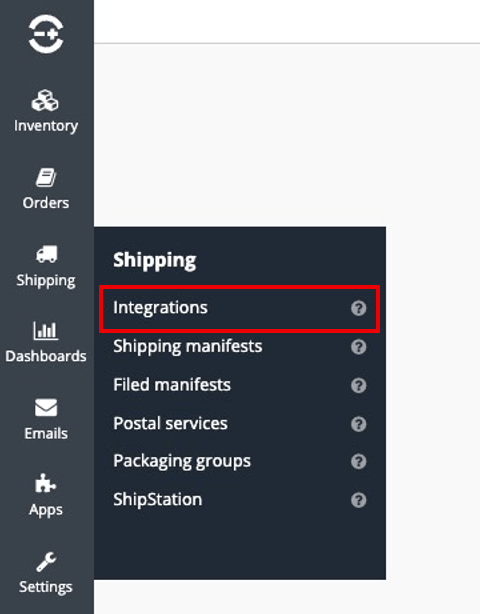
This is where the Stream service configuration will be added.
Configure API Credentials
To enable communication between Linnworks and Stream, the integration must be connected using Stream API credentials.
You will need to enter:
- Stream API Endpoint
- API Key
- Authentication Token
- Account Identifier (if required)
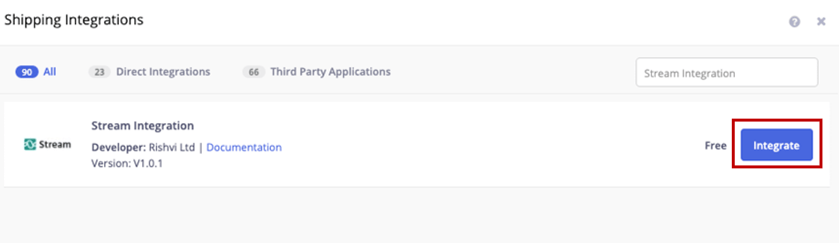
These credentials allow the integration service to securely send and receive shipment data.
Configure Sender Address
The sender address represents the warehouse or business location from which shipments will be dispatched.
Provide the following details:
- Sender name
- Company name
- Warehouse address
- City
- Postal code
- Country
- Contact phone number
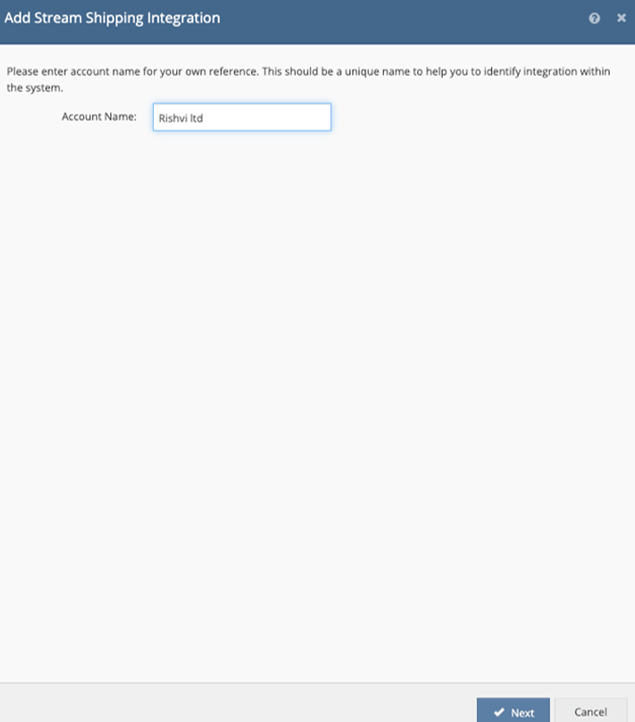
This information is used by Stream when generating shipments and shipping labels.
Configure Warehouse Mapping
Warehouses in Linnworks must be mapped to the corresponding shipment locations used in the Stream platform.
This ensures that orders dispatched from specific warehouses are correctly processed in Stream.
During configuration:
- Select the Linnworks warehouse
- Assign the corresponding Stream depot or location
- Save the mapping configuration

This mapping allows shipments to be processed from the correct logistics location.
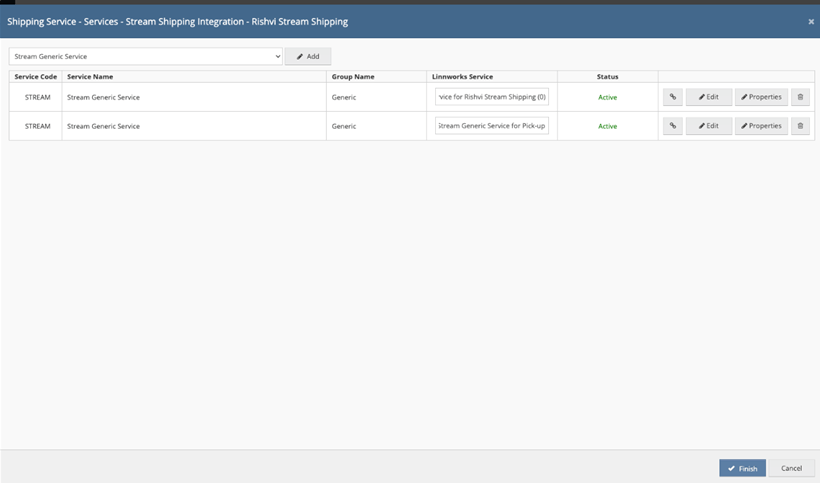
Configure Shipping Services
Shipping services must be mapped between Linnworks and Stream so that orders use the correct delivery method.
For each shipping service you should configure:
- Service name
- Service identifier
- Delivery method
- Label generation settings
- Default warehouse configuration
Multiple services can be configured depending on the delivery options offered to customers.
Configure Label Settings
The integration allows shipping labels to be generated automatically during dispatch.
Configure label settings including:
- Label format
- Number of label copies
- Printing preferences
- Label generation trigger
This ensures that warehouse staff can generate labels quickly during order fulfillment.
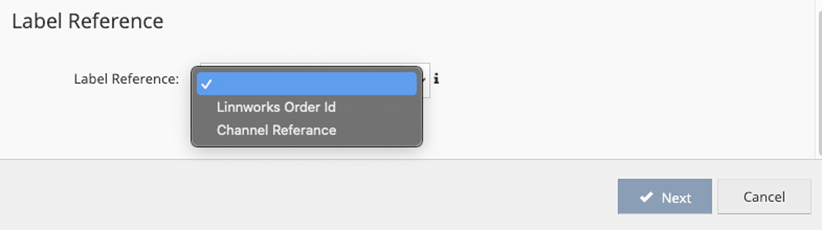
Enable Order Synchronization
Once services and warehouses are configured, order synchronization can be activated.
Enable:
- Automatic order transfer
- Dispatch synchronization
- Order lookback period

Orders assigned with Stream as the shipping vendor will automatically be sent to the Stream platform for shipment processing.
Configure Delivery Runs and Routing
Stream supports delivery planning using delivery runs.
During configuration you may define:
- Delivery run identifiers
- Delivery day assignments
- Delivery sequence rules
This helps organize shipments into optimized delivery routes.
Enable Tracking Synchronization
Tracking synchronization allows shipment tracking numbers and delivery updates to be automatically returned to Linnworks.
Configure:
- Shipment tracking updates
- Webhook notifications
- Delivery status synchronization
This ensures order records remain up to date.
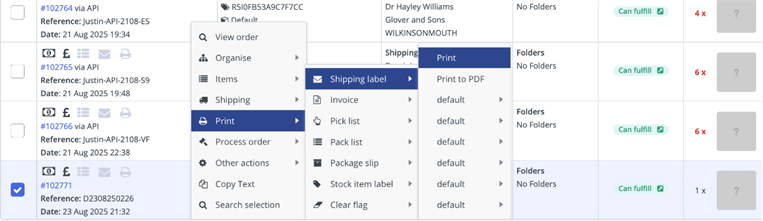
Test the Integration
Before using the integration in production, run test orders to verify the setup.
Testing should confirm:
- Orders are successfully sent to Stream
- Shipments are created correctly
- Labels generate properly
- Tracking numbers sync back to Linnworks
Testing ensures the integration is working correctly before live operations begin.
Activate the Integration
Once testing is complete, the Stream integration can be activated for live order processing.
Orders assigned to Stream as the shipping vendor will automatically begin syncing to the Stream platform for shipment creation and delivery planning.
Why Us
Why Choose Rishvi for Stream Integration
Rishvi provides professional Linnworks integration services designed to help businesses automate logistics workflows and improve fulfillment operations.
Our team assists businesses with:
- Stream integration setup
- Shipping service configuration
- Logistics workflow optimization
- Integration testing and validation
- Ongoing technical support
We ensure that the Stream integration is configured correctly and operates seamlessly within your Linnworks environment.