


RIS-SM-1033 Auto Archive Inventory
The “AutoArchiveInventory” macro automates the process of archiving inventory items within the system based on a specified suffix or prefix. This functionality helps streamline inventory management by automatically categorizing and organizing items for archival purposes.
There are three steps you need to complete to start using the macro:
- 1. Go to Apps > Application Store > AutoArchiveInventory > click Install and follow the on-screen instructions until the installation is complete.
- 2. Configure the macro.
- 3. Configure the rule in the Rules Engine screen.
Functionality
Parameter Input
Suffix Or Prefix: Specifies whether the items to be archived should have a particular suffix or prefix in their names.
Rules Engine Integration
Seamlessly integrates with the Rules Engine, enabling it to be invoked based on predefined conditions or scheduled intervals.
Inventory Archiving
1. Automatically identifies inventory items that match the specified suffix or prefix.
2. Archives these items to streamline inventory management and declutter the active inventory list.
Logging and Error Handling
Implements logging mechanisms to record actions for transparency and facilitate troubleshooting in case of errors.
Configure the Macro
Once the AutoArchiveInventory app is installed:
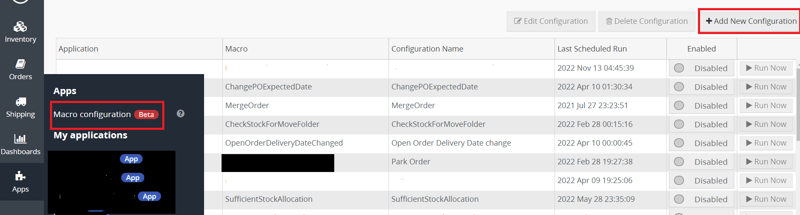
Step 1 : Go to Apps > Macro Configuration and click + Add new configuration.
Step 2 : Select the AutoArchiveInventory macro and click Create Configuration.

Step 3 : In the Macro Configuration screen, specify the below details and click Save:

Step 4 : Make sure to enable the macro to continue with the Rules Engine configuration.

Usage of App
Parameters
suffixOrPrefix: Specifies whether the items to be archived should have a particular suffix or prefix in their names.
Execution
1. Execute the macro within the Rules Engine interface.
2. Trigger the inventory archiving process manually or schedule it to run at specified intervals.
Outcome
1. Automatically archives inventory items based on the specified suffix or prefix, decluttering the active inventory list.
2. Improves inventory management efficiency by organizing items for archival purposes.
3. Provides confirmation upon completion of the archiving process and delivers any pertinent status updates or notifications.


